Telefon kamerasıyla raket sporları analiziRacket-sports analysis with your phone camera

Raketinizi takip edin.
Oyununuzu ölçün.
Track your racket.
Measure your game.

MotiRacq telefon kameranızla seansınızı kaydeder; kortu tanır, oyuncuyu, raketi ve topu takip eder. Vuruşlarınızı, raket ve top hızını, koşu mesafenizi ve ısı haritanızı analizli videoyla birlikte sunar.MotiRacq records your session with your phone camera, recognises the court and tracks player, racket and ball. You get your strokes, racket and ball speed, distance covered and a heatmap, together with an analysed video.

Yakında App Store'daComing soon to the App Store TestFlight betaTestFlight beta
  • TenisTennis
  • Padel
  • Badminton
  • Squash
  • Pickleball
  • Masa tenisiTable tennis

ÖzelliklerFeatures

Antrenmanınız, sayılarlaYour session, in numbers

Kort, oyuncu, raket ve top aynı anda takip edilir. Sonuçlar seans raporunda ve videonun üzerinde.Court, player, racket and ball are tracked together. Results appear in the session report and on top of your video.

Kort tanımaCourt recognition

Kort çizgileri otomatik bulunur (canlı modda elle kalibrasyon); gerekirse birkaç dokunuşla düzeltebilirsiniz. Ölçümler kort düzlemine oturur; en tutarlı sonuç sabit kamerayla alınır.Court lines are found automatically (manual calibration in live mode) and can be corrected with a few taps. Measurements are placed on the court plane; a fixed camera gives the most consistent results.

Vuruş tespitiStroke detection

Forehand, backhand, servis, vole ve smaç; raket ve vücut hareketinden otomatik sınıflandırılır. Sınıflandırma beta aşamasındadır ve her vuruşta doğru olmayabilir.Forehand, backhand, serve, volley and overhead, classified automatically from racket and body motion. Classification is in beta and will not be right on every shot.

Raket ve top hızıRacket & ball speed

Vuruşlarda raket savuruş hızı ve top hızı (km/sa), vuruş noktası ve spin türü; servis hızlarınız tek tek listelenir. Kort kalibre edilmemişse veya tek kamerayla top hızı ölçülemiyorsa değerler tahmini olarak işaretlenir.Racket swing speed and ball speed (km/h), impact point and spin type for your shots, with serve speeds listed one by one. Without court calibration, or when a single camera cannot measure the ball speed, the values are marked as estimates.

Hareket ve ısı haritasıMovement & heatmap

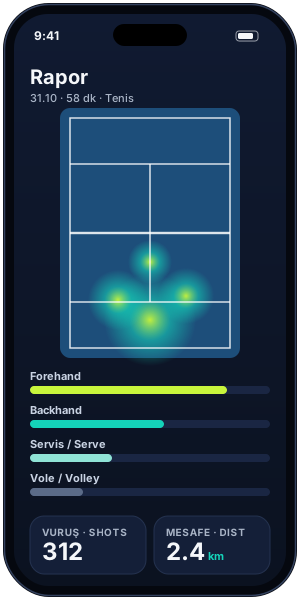
Koşu mesafesi, sprint hızı, yön değiştirme ve sıçramalar. Kortta en çok nerede durduğunuzu ısı haritasında görün.Distance covered, sprint speed, direction changes and jumps. See where you spend most of your time on a court heatmap.

Analizli videoAnalysed video overlay

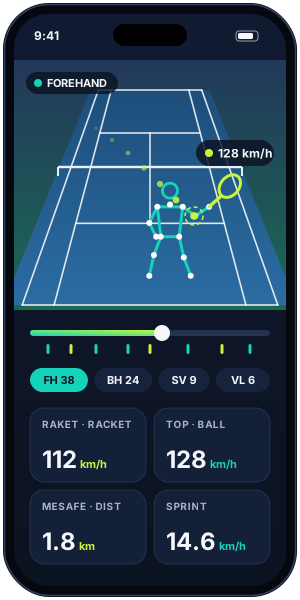
Videonuzu kort çizgileri, iskelet, raket ve top izi üst üste çizilmiş olarak izleyin. Her vuruşa tek dokunuşla atlayın.Watch your video with court lines, skeleton, racket and ball trail drawn on top. Jump to any shot with one tap.

Çoklu sporMulti-sport

Tenis, padel, badminton, squash, pickleball ve masa tenisi. Kort ölçüleri ve vuruş türleri spora göre ayarlanır. Tenis dışındaki sporlarda vuruş türü sınıflandırması deneyseldir.Tennis, padel, badminton, squash, pickleball and table tennis. Court dimensions and stroke types adapt to the sport. Outside tennis, stroke-type classification is experimental.

Tek veya çift kameraSingle or dual camera

Tek telefonla yandan ya da arkadan çekin. İkinci telefonu eşleştirirseniz kayıtlar senkronlanır ve top, raket ile eklemler 3B olarak hesaplanır.Film with one phone from the side or from behind. Pair a second phone and the recordings are synchronised so ball, racket and joints are computed in 3D.

Canlı modLive mode iOS · TenisiOS · Tennis

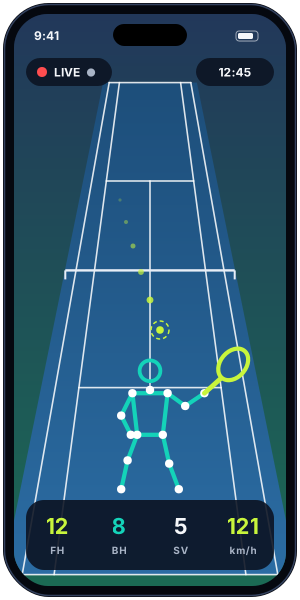
Şimdilik yalnızca iPhone'da ve tenis için. Telefon görüntüyü anında işler, vuruş sayaçları seans sırasında güncellenir. Tam video saklanmaz, yalnızca takip verisi ve vuruş klipleri tutulur.For now iPhone only and tennis only. The phone processes frames as they arrive and stroke counters update during the session. No full video is stored, only tracking data and short shot clips.

Profil istatistikleriProfile statistics

"Profilim" ekranında tüm seanslarınızın özeti: vuruş dağılımı, en yüksek hızlar, toplam mesafe ve zaman içindeki gelişiminiz.Your "My profile" screen sums up every session: stroke mix, top speeds, total distance and how you improve over time.
UygulamaThe app

Videodan raporaFrom video to report

Seans raporuSession reportIsı haritası, vuruş dağılımı, mesafeHeatmap, stroke mix, distance
Canlı modLive modeSeans sırasında anlık sayaçlarReal-time counters during play

Görseller temsilidir; uygulama ekranları beta sürecinde değişebilir.Illustrations only; app screens may change during the beta.

Nasıl çalışırHow it works

Üç adımda analizAnalysis in three steps

  1. Yerleştirin ve kalibre edinSet up and calibrate

    Telefonu kortu görecek şekilde yerleştirin. Uygulama kort çizgilerini otomatik bulur (canlı modda kortu elle işaretlersiniz); gerekirse birkaç dokunuşla düzeltebilirsiniz.Place your phone so it sees the court. The app finds the court lines automatically; fix them with a few taps if needed.

  2. Kaydedin ya da canlı oynayınRecord or go live

    Seansı ağır çekimde kaydedin, galeriden bir video seçin ya da canlı modda oynayın. İsterseniz ikinci telefonu eşleştirin.Record in slow motion, import a video from your library, or play in live mode. Pair a second phone if you like.

  3. İzleyin ve gelişiminizi görünReview and improve

    Analiz bitince raporu ve analizli videoyu açın. Vuruşlarınızı tek tek izleyin, hızlarınızı karşılaştırın, profilinizde gelişiminizi takip edin.When the analysis is done, open the report and the analysed video. Replay each shot, compare speeds and follow your progress on your profile.

Kamera yerleşimiCamera placement

Doğru açı, doğru ölçümThe right angle, the right numbers

  • Sabitleyin: tripod ya da file/çit tutucusu kullanın; elde çekimde ölçümler güvenilir olmaz.Keep it steady: use a tripod or a fence mount; handheld footage does not give reliable numbers.
  • Yükseklik: göz hizasından yüksek (yaklaşık 1,5–2,5 m) bir açı, kort çizgilerinin ve topun daha iyi görünmesini sağlar.Height: an elevated angle (about 1.5–2.5 m) shows the court lines and the ball more clearly.
  • Kortun tamamı kadrajda: kendi yarı sahanızdaki dip çizgi ve servis çizgileri görünmeli; oyuncu kadrajdan çıkmamalı.Whole court in frame: your baseline and service lines must be visible, and the player should stay in the picture.
  • Yatay tutun ve ağır çekim seçin: telefonu yatay konumda kullanın; 240 fps en iyisi, en az 120 fps.Landscape and slow motion: hold the phone in landscape; 240 fps is best, 120 fps minimum.
  • Işık: güneşi ya da projektörü tam karşınıza almayın; ters ışık topun görünmesini zorlaştırır.Light: avoid pointing straight into the sun or floodlights; backlight makes the ball hard to see.
AB YS
YSYandan: fileye dik, servis çizgisi hizasında. Vuruş noktası, raket hızı ve sıçramalar için en iyisi.Side: perpendicular to the court, level with the service line. Best for impact point, racket speed and jumps.
ABArkadan: dip çizginin arkasında, ortada ve mümkünse yüksekte. Kort konumu, mesafe ve top yönü için en iyisi.Back: behind the baseline, centred and elevated if possible. Best for court position, distance and ball direction.
2Çift kamera: yandan ve arkadan iki telefon birlikte; QR kodla eşleşir, kayıt aynı anda başlar ve sonuçlar 3B hesaplanır.Dual: two phones, side and back; they pair with a QR code, start recording together and results are computed in 3D.

SSSFAQ

Sık sorulan sorularFrequently asked questions

Hangi sporları destekliyor?Which sports are supported?

Tenis, padel, badminton, squash, pickleball ve masa tenisi. Uygulamada sporunuzu seçersiniz; kort ölçüleri ve vuruş türleri buna göre ayarlanır. Tenis dışındaki sporlarda vuruş türü sınıflandırması deneyseldir.

Tennis, padel, badminton, squash, pickleball and table tennis. You pick your sport in the app and court dimensions and stroke types follow it. Outside tennis, stroke-type classification is experimental.

Hangi telefon gerekiyor?Which phone do I need?

iPhone veya Android. En iyi sonuç için 240 fps ağır çekim destekleyen bir telefon önerilir; 120 fps de çalışır ama hız ölçümleri daha az hassas olur. Canlı mod şimdilik yalnızca iPhone'da ve tenis için.

An iPhone or Android phone. A phone that records 240 fps slow motion gives the best results; 120 fps works with less precise speed numbers. Live mode is iPhone-only and tennis-only for now.

Uygulama ne zaman yayında?When is the app available?

MotiRacq şu anda kapalı beta aşamasında (TestFlight). Yakında App Store'da. Üyelik isteği bırakırsanız sıranız geldiğinde size haber veririz.

MotiRacq is currently in closed beta (TestFlight) and coming soon to the App Store. Leave an access request and we will let you know when it is your turn.

Hesabımı nasıl açarım?How do I get an account?

Hesaplar davetle açılır. Üyelik isteği formunu doldurursunuz, ekibimiz isteği inceler; onaylanınca giriş bilgileriniz e-posta ile gönderilir ve ilk girişte şifrenizi değiştirirsiniz.

Accounts are invite-only. You fill in the access request form, our team reviews it, and once approved you receive your sign-in details by email and set your own password on first sign-in.

Videolarım nereye gidiyor?Where do my videos go?

Kaydettiğiniz videolar analiz için şifreli bağlantıyla analiz sunucusuna yüklenir. Canlı modda tam video hiç saklanmaz. Hesabınızı ve verilerinizi uygulamadan istediğiniz an silebilirsiniz. Ayrıntılar Gizlilik Politikası'nda.

Recorded videos are uploaded over an encrypted connection to the analysis server. In live mode no full video is stored at all. You can delete your account and data from the app at any time. See the Privacy Policy for details.

Kamera sabit olmak zorunda mı?Does the camera have to be fixed?

Evet, telefonu tripod veya file/çit tutucusuyla sabitlemeniz gerekir. Küçük titreşimler tolere edilir; elde ya da hareket eden kamerayla çekilen videolarda ölçümler güvenilir olmaz.

Yes, mount the phone on a tripod or a fence holder. Small vibrations are tolerated; with a handheld or moving camera the measurements are not reliable.

İki telefon şart mı?Do I need two phones?

Hayır, tek telefon yeterli. İkinci bir telefon eklerseniz iki açı birleştirilir ve top ile raket konumları 3B hesaplanır; hız ve vuruş noktası daha doğru olur.

No, one phone is enough. Adding a second phone combines two angles so ball and racket positions are computed in 3D, which improves speed and impact-point accuracy.

Ücretli mi?Does it cost anything?

Beta döneminde erişim davetle verilir. Fiyatlandırma yayın öncesinde duyurulacak.

During the beta, access is by invitation. Pricing will be announced before launch.

Beta için yerinizi ayırtınSave your spot in the beta

Hesaplar davetle açılıyor. Formu doldurun, sıranız geldiğinde e-postayla haber verelim.Accounts are invite-only. Fill in the form and we will email you when it is your turn.

Üyelik isteği gönderRequest access